RPS data entry best practices for owner and parcel location information
When updating information or reviewing sales in RPSV4 or RPS Online, it is important to maintain consistency in your data entry practices. This will help to ensure the integrity of your data and avoid future issues.
We recommend you follow these guidelines when updating ownership information:
- List only legal owners of the property.
- If there are multiple owners, list each one on its own line.
- Ensure that the owners for STAR purposes are listed in the owner fields where possible.
When entering addresses, be consistent in your formatting:
- If the property address and mailing address are the same, they should be formatted the same way.
- Complete all provided fields, such as street direction, whenever possible.
- If a directional word is truly part of a street name, such as North Street, spell it out in the Street/ Rural Route field.
When completing parcel location:
- include the municipality and hamlet or other descriptive name (Note: RPS Online has a hamlet field, RPSV4 does not) as applicable (this may not necessarily match the mailing address, which is dependent on the post office); and
- include the ZIP code if the parcel has a mailing address (Look up a ZIP code).
Depending on how a property is owned (for example individual, trust, government-owned, ect.), certain considerations should be taken into account when completing ownership information.
Use the following charts to determine the appropriate best practices to follow.
| Who to list as owners | How to list owners | Additional information |
|---|---|---|
| legal owners of the property | Ensure that the owners for STAR purposes are listed in the owner fields. | Do not include any non-owner spouses. |
| Owners | Do | Do not |
|---|---|---|
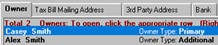
| Casey Smith and Alex Smith |
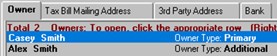
Primary owner: Casey Smith Additional owner: Alex Smith
|
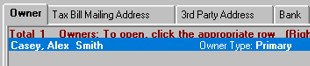
Primary owner: Casey, Alex Smith
|
| Who to list as owners | How to list owners | Additional information |
|---|---|---|
| life estate holder (life tenant) | primary owner | Populate Ownership: E.G. Life Use field |
| additional life estate holder | additional owner | Populate Ownership: E.G. Life Use field |
| remainderman | additional owner | Populate Ownership: E.G. Life Use field |
| Owners | Do | Do not |
|---|---|---|
|
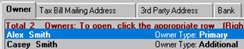
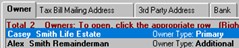
Casey Smith (life estate holder) Alex Smith (remainderman) |
Primary owner: Casey Smith Additional owner: Alex Smith
|
Primary owner: Alex Smith Additional owner: Casey Smith
or Primary owner: Casey Smith Life Estate Additional owner: Alex Smith Remainderman
|
| Who to list as owners | How to list owners | Additional information |
|---|---|---|
| trustee | primary owner | |
| beneficiaries | additional owner |
Beneficiaries are considered owners for STAR purposes. Populate Ownership: E.G. Life Use field |
| legal name of the trust | List after any beneficiaries as an additional owner. | Populate Ownership: E.G. Life Use field |
| Owners | Do | Do not |
|---|---|---|
|
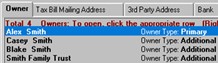
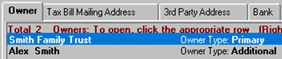
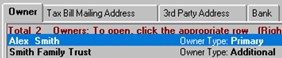
Smith Family Trust (trust) Casey Smith (beneficiary) Blake Smith (beneficiary) Alex Smith (trustee) |
Primary owner: Alex Smith Additional owner: Casey Smith Additional owner: Blake Smith Additional owner: Smith Family Trust
|
Primary owner: Smith Family Trust Additional owner: Alex Smith
or Primary owner: Alex Smith Additional owner: Smith Family Trust
|
| Who to list as owners | How to list owners |
|---|---|
|
legal name of the entity |
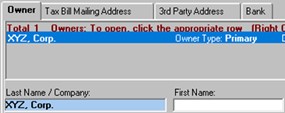
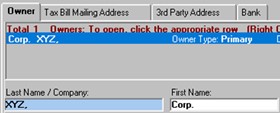
In RPSV4, leave first name blank, complete the last name /company field. In RPS Online, complete the business field. |
| Owner | Do | Do not |
|---|---|---|
| XYZ, Corp. |
Primary owner: XYZ, Corp. (in last name/company or business field)
|
Primary owner: Corp. (in first name field), XYZ, (in last name field)
|
| Who to list as owner | How to list owner | Additional information |
|---|---|---|
|
name of the governmental entity |
In RPSV4, leave first name blank, complete the last name /company field. In RPS Online, complete the business field. |
Naming conventions should be consistent, for example State of New York vs NYS. |
| Owner | Do | Do not |
|---|---|---|
| State of New York |
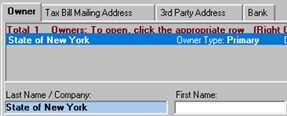
Primary owner: State of New York (in last name/company or business field)
|
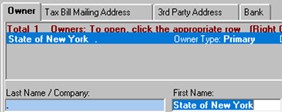
Primary owner: State of New York (in first name field)
|